프로토타입
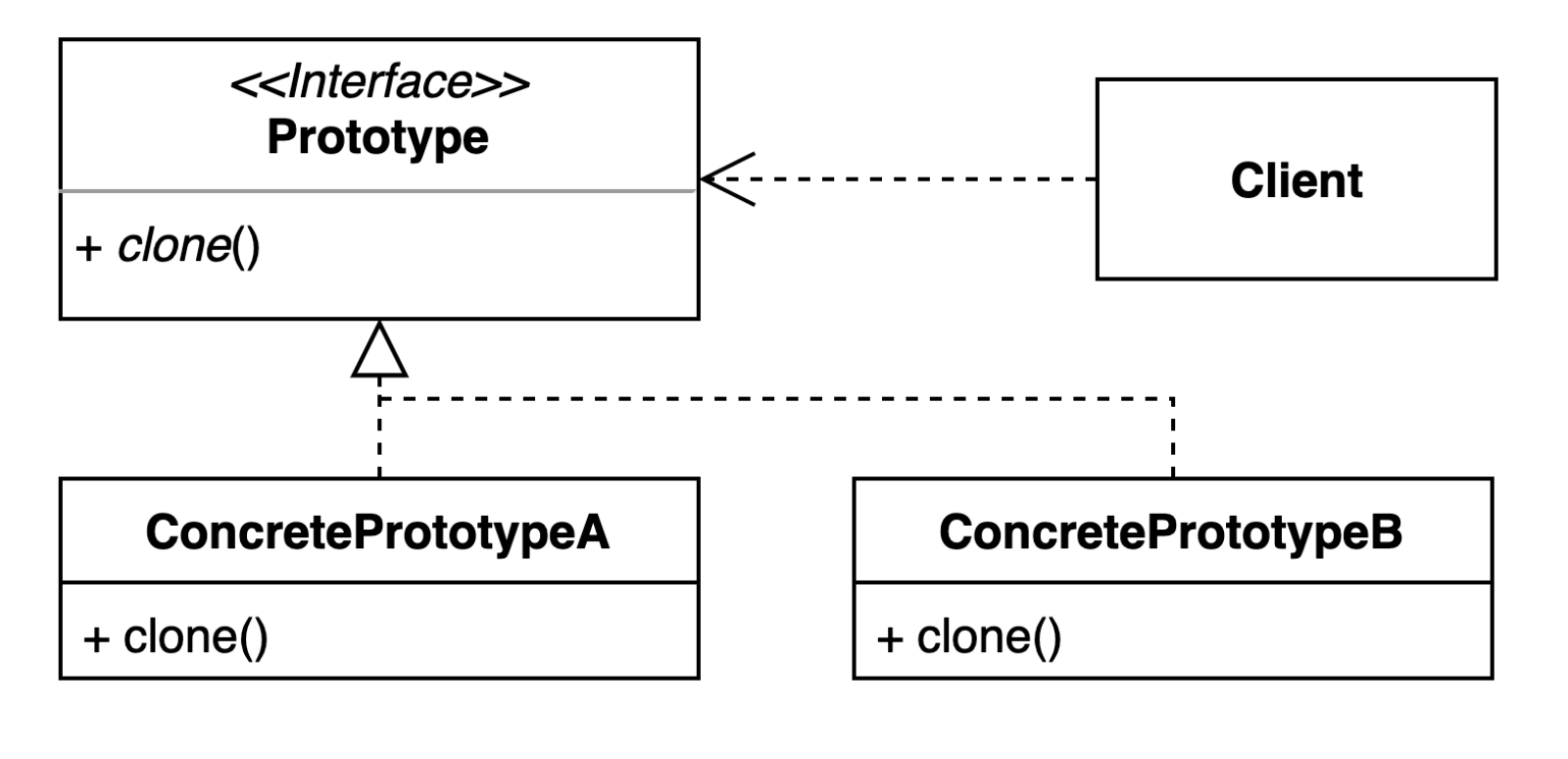
기존 인스턴스를 복제하여 새로운 인스턴스를 만드는 방법
clone()을 구현하여 인스턴스를 복제
예제

GithubRepository
GithubIssue에 필드로 들어갈 GitHubReopsitory
@Getter
@Setter
public class GithubRepository {
   private String user;
   private String name;
}
GithubIssue
clone()을 구현하기 위해서는 Clonable 인터페이스를 상속받아야 한다.clone()메서드를 오버라이드하면 자바가 구현해놓은clone()을 사용할 수 있다.
@Getter
@Setter
public class GithubIssue implements Cloneable{
   private int id;
   private String title;
   private GithubRepository repository;

   public GithubIssue(GithubRepository repository) {
      this.repository = repository;
   }

   public String getUrl() {
      return String.format("https://github.com/%s/%s/issues/%d",
         repository.getUser(),
         repository.getName(),
         this.getId());
   }

   @Override
   protected Object clone() throws CloneNotSupportedException {
      return super.clone();
   }

   @Override
   public boolean equals(Object o) {
      if (this == o)
         return true;
      if (o == null || getClass() != o.getClass())
         return false;
      GithubIssue that = (GithubIssue)o;
      return id == that.id && Objects.equals(title, that.title) && Objects.equals(repository,
         that.repository);
   }

   @Override
   public int hashCode() {
      return Objects.hash(id, title, repository);
   }
}
Shallow Clone vs Deep Clone
위의 예시는 Clonable 인터페이스를 구현받아서 clone()메서드를 오버라이드했다. 자바에서 구현한 clone()은 Shallow Clone이다.
Shllow Clone : 해당 객체를 복사해서 반환
Deep Clone : 해당 객체가 가지고 있는 필드까지 새로만들어서 복사 후 반환
GithubIssue클래스는 필드로 GithubRepository 객체를 가지고있다. Clonable을 이용한 복사를 하면 복사된 GithubIssue 객체와 원본 객체는 GithubRepository를 공유하게된다.
예시
public Test class {
    public static void main(String[] args) {
        GithubRepository repository = new GithubRepository();
        repository.setUser("whiteship");
        repository.setName("live-study");

        GithubIssue githubIssue = new GithubIssue(repository);
        githubIssue.setId(1);
        githubIssue.setTitle("title");

        GithubIssue clone = (GithubIssue) githubIssue.clone();
        // false
        System.out.println(githubIssue == clone);
        // true
        System.out.println(githubIssue.getRepository() == clone.getRepository())
    }
}
shallow clone을 사용했기 때문에 두 객체의 GithubRepository == 비교는 true가 반환된다. 필드 객체까지 새로운 객체로 복제하려면 Deep clone을 해야하는데 어떻게 구현할 수 있을까?
Deep clone
@Override
protected Object clone() throws CloneNotSupportedException {
   GithubRepository repository = new GithubRepository();
   repository.setUser("whiteship");
   repository.setName("live-study");

   GithubIssue githubIssue = new GithubIssue(repository);
   githubIssue.setId(1);
   githubIssue.setTitle("title");
   return githubIssue;
}
그냥 위에서 적은 코드를 clone()메서드의 구현부에 입력하면 된다. 근데 이렇게하면 굳이 Clonable 인터페이스를 구현할 필요는 없어보인다. 여튼 이런 방식으로 clone()을 구현하면 Deep clone이 가능하다.
장/단점
장점
- 복잡한 객체를 만드는 과정을 숨길 수 있다.
- 기존의 객체를 복제하는 과정이 새 인스턴스를 만드는 것보다 효율적이다.
- 추상적인 타입을 리턴할 수 있다.
단점
- 복잡한 객체를 만드는 과정이 복잡할 수 있다. (특히, 순환참조가 있는 경우)
개인적인 의견
프로토타입 패턴은 패턴이라기보다는 인스턴스를 복제하는 메서드 구현방법을 알려주는 느낌이다. 특히 Deep clone은 새로운 객체를 만드는 과정을 메서드로 숨긴 정도이고 큰 패턴이 있다느 생각이 들지는 않는다. 그냥 복제가 필요할 때 참고해서 사용해야겠다.
'Java > 디자인 패턴' 카테고리의 다른 글
| [디자인 패턴] 브릿지 패턴 (0) | 2023.04.24 |
|---|---|
| [디자인 패턴] 어댑터 패턴 (0) | 2023.04.22 |
| [디자인 패턴] 빌더 패턴 (0) | 2023.04.19 |
| [디자인 패턴] 추상 팩토리 (0) | 2023.03.02 |
| [디자인 패턴] 팩토리 메서드 (0) | 2023.03.02 |